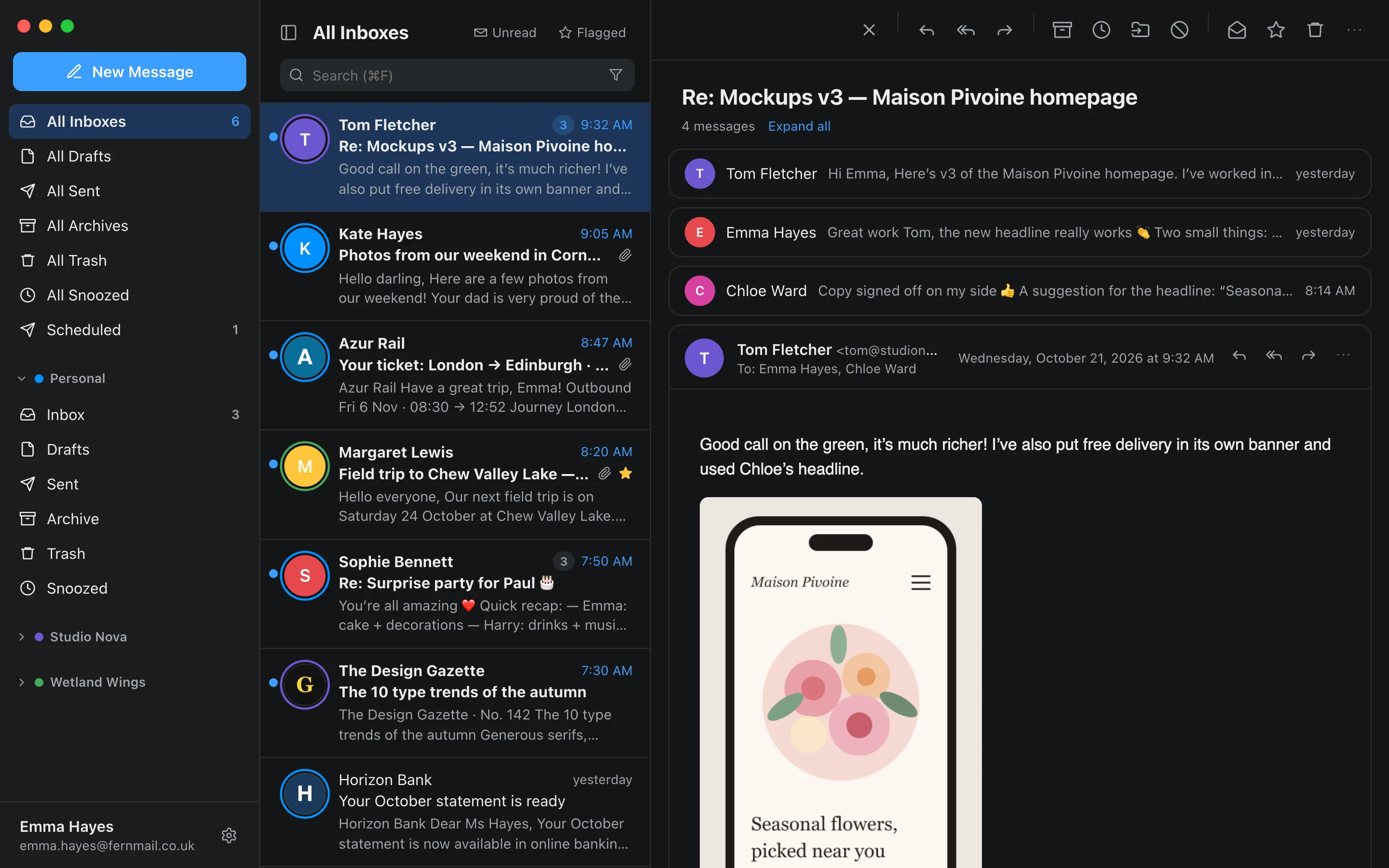
Coming soon to Mac, Windows, Linux, iPhone, iPad and Android
All your inboxes.One calm place.
Heron brings Gmail, Outlook, iCloud and every IMAP mailbox together in one calm, fast app. Add an account once and it shows up on all your devices.
macOS Soon — not available yet
Windows Soon — not available yet
Linux Soon — not available yet
App Store Soon — not available yet
Google Play Soon — not available yet
Features
Built to get you out of your inbox, not to keep you there.
Everything you expect from a modern email client, with no ads and no noise.
All Inboxes
One list for every account.
Personal, work, side projects: your messages land in “All Inboxes”, each tagged with its account’s color. Your Heron account remembers your mailboxes and settings and syncs them to every device.
Add Gmail on your phone and it appears on your computer too
Read, flagged, archived: state follows you across devices in real time
Choose, device by device, which accounts show up in unified views
Conversations
Threads that finally make sense.
Replies in the same thread are grouped on a single line. Open the conversation: older messages fold away and the latest one is shown in full.
Expand or collapse everything at once
Print or export the whole conversation
Or switch back to one message per line if you prefer
Snooze · Schedule · Undo
The right message, at the right time.
Snooze an email until tonight, tomorrow or the weekend and it comes back to the top of your inbox right on time. Schedule a send for Monday 9 AM. And if you hit Send too fast, “Undo” brings it back to the editor.
Later today, tonight, tomorrow, this weekend, next week or any date
Scheduled emails go out on time, even with your computer off
Adjustable undo-send delay
Search
Find any email in a few keystrokes.
Search every account at once and narrow it down with filters: sender, recipient, subject, attachments, unread, dates, folder or account. Power users can type from:, has:attachment or after: directly.
Filters as chips, removable in one click
Keyboard syntax for speed
Contact card: their emails, your replies, their attachments
Compose
Write, attach, sign. No friction.
Rich formatting, per-account signatures, drag-and-drop attachments and recipients suggested from your conversations. Drafts save themselves and follow you to every device.
Bold, lists, quotes, links
One signature per mailbox
Synced drafts, ⌘↵ to send
Privacy
Your email is not the product.
No ads, no selling your data, no mining your messages for commercial purposes. Heron only does what you ask it to.
Remote images, often used to tell when you open an email, are blocked by default. Show them for one message, for a trusted sender, or always.
Encrypted credentials
Mailbox passwords and tokens are encrypted with AES-256-GCM before they are stored. With Google and Microsoft, Heron never even sees your password.
Your email stays put
Full message bodies and attachments are not kept: they are read from your mail server when you open them.
Headers under the microscope
Check SPF, DKIM and DMARC, follow a message from server to server and spot a suspicious sender.
One-click deletion
Delete your account from the settings and everything Heron keeps is erased. Your mailboxes at your provider are left untouched.
And also
The details that make the difference.
Notifications, per device
Your phone rings for personal mail, your computer for work. Each device picks its accounts.
Gmail, Outlook and any IMAP
One-click Google or Microsoft sign-in, iCloud, Fastmail, Yahoo, or any IMAP/SMTP server.
Native everywhere
Keyboard shortcuts, macOS menus, iPad menu bar and keyboard support, light and dark mode.
Export your email
A message as PDF or .eml, a whole conversation as .mbox. Clean printing.
Effortless attachments
Preview, open, “Save all” and drag and drop, on desktop and on mobile.
In English and French
The interface follows your device’s language. Light, dark or automatic theme.
Platforms
One account. All your devices.
A real app on every system, with its own gestures, menus and shortcuts. Your Heron account ties them together.
On your computer
macOS, Windows and Linux. Native menus, keyboard shortcuts, system notifications.
macOSApple silicon and Intel Soon — not available yet
WindowsWindows 10 and 11 Soon — not available yet
LinuxAppImage Soon — not available yet
On phone and tablet
iPhone, iPad and Android. Push notifications, gestures, and on iPad the menu bar and keyboard shortcuts.
App StoreiPhone and iPad Soon — not available yet
Google PlayAndroid Soon — not available yet
FAQ
Frequently asked questions
Which mailboxes can I add?
Gmail and Outlook / Hotmail / Microsoft 365 with “Sign in with Google / Microsoft”, iCloud, Fastmail and Yahoo with an app password, and any IMAP/SMTP mailbox by entering its servers.
Why do I need a Heron account?
It remembers your mailboxes and preferences so you find them on every device. It also lets Heron notify you, send your scheduled emails on time and bring snoozed emails back, even when the app is closed.
Where is my email stored?
At your provider, as it is today. Heron only keeps an index to show your lists quickly (sender, subject, date, the beginning of the text). Full content and attachments are read from your mail server when you open a message.
Are my passwords safe?
They are encrypted (AES-256-GCM) before being stored and are only used to connect to your mailboxes. With Google and Microsoft, you sign in on their side: Heron receives a revocable authorization, never your password.
Can I delete my account?
Yes, at any time from the app’s settings. All data kept by Heron is erased; your mailboxes and messages at your provider stay intact.
When will Heron be available?
Very soon. The Mac, Windows, Linux, iPhone, iPad and Android apps launch together. Drop us a line to hear about the launch.
Take flight.
Heron is coming soon to all your devices. Drop us a line to hear about the launch.